 MP3 Skype Recorder - !Discontinued!
As Skype has gone into its end-of-life phase, MP3 Skype Recorder has been retired.
We encourage you to move on to our next-generation solution—Desktop Call Recorder, the one-click automatic call recording solution for Microsoft Teams, Zoom, Slack, Webex, WhatsApp, Telegram, and numerous other web callers
MP3 Skype recorder is free for non-commercial use.
Please read MP3 Skype Recorder Terms of Use before installing and running this program.
System requirements:
- Supported versions of Skype:
- Skype app for Windows 11, 10 (from Microsoft Store)
- Skype for Desktop
- OS : Windows 11, 10, 8, 7
- .Net Framework 4.0 or later (will be downloaded from the Microsoft site and installed automatically )
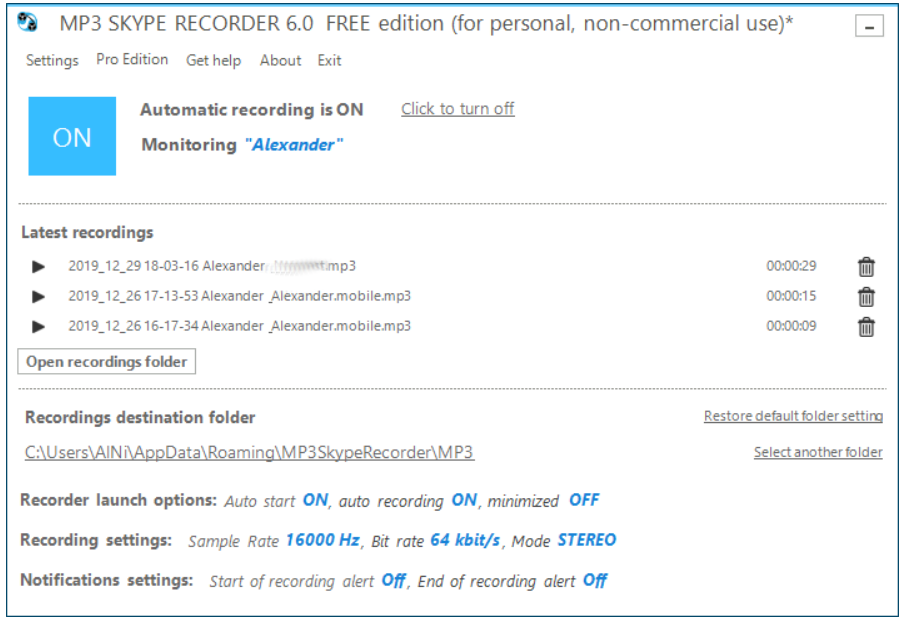
MP3 Skype Recorder is a free for private non-commercial use program which automatically records all your Skype conversations (including conferences). It stores your conversations locally in files using compact and very popular MP3 format. The tool can record P2P Skype calls and SkypeOut calls as well as calls to Skype Online number. The program sits in the system tray and monitors skype calls.It starts recording automatically when you begin conversation. It can record several calls simultaneously (one active with others on hold). When doing so the recorder stores every call in separate file for later use. Simple and intuitive interface requires almost no tuning. All you have to do is install the program and provide it with access to the Skype client.
Information contained in the conversation may be valuable for you in many ways for many reasons.
Making and keeping the records may help your business and sometimes guard your reputation.
Main features of MP3 Skype Recorder:
- Automatic or manual recording capabilities.

- Compact format of stored records (mp3 files).
- May be used to record P2P, SkypeOut calls and calls made to Online number.
- Capable to track simultaneous calls and to save them separately.
- Easy integration with Skype Conference recording.
- Intuitive easy to use interface.
The program is distributed "AS IS" with no warranty, but it's absolutely free to use for personal, non-business use.
Please 'report a bug' button on the main program screen to report any kind of issue with recorder.